Restore lost Chrome tabs, windows and tab groups
Workspace Recovery Vault is a Chrome session manager that saves verified restore points of your whole workspace automatically. When Chrome crashes, a window closes by accident or a session disappears, pick a moment and recover what you need.
Add to Chrome, it's free Lost tabs right now? Read this first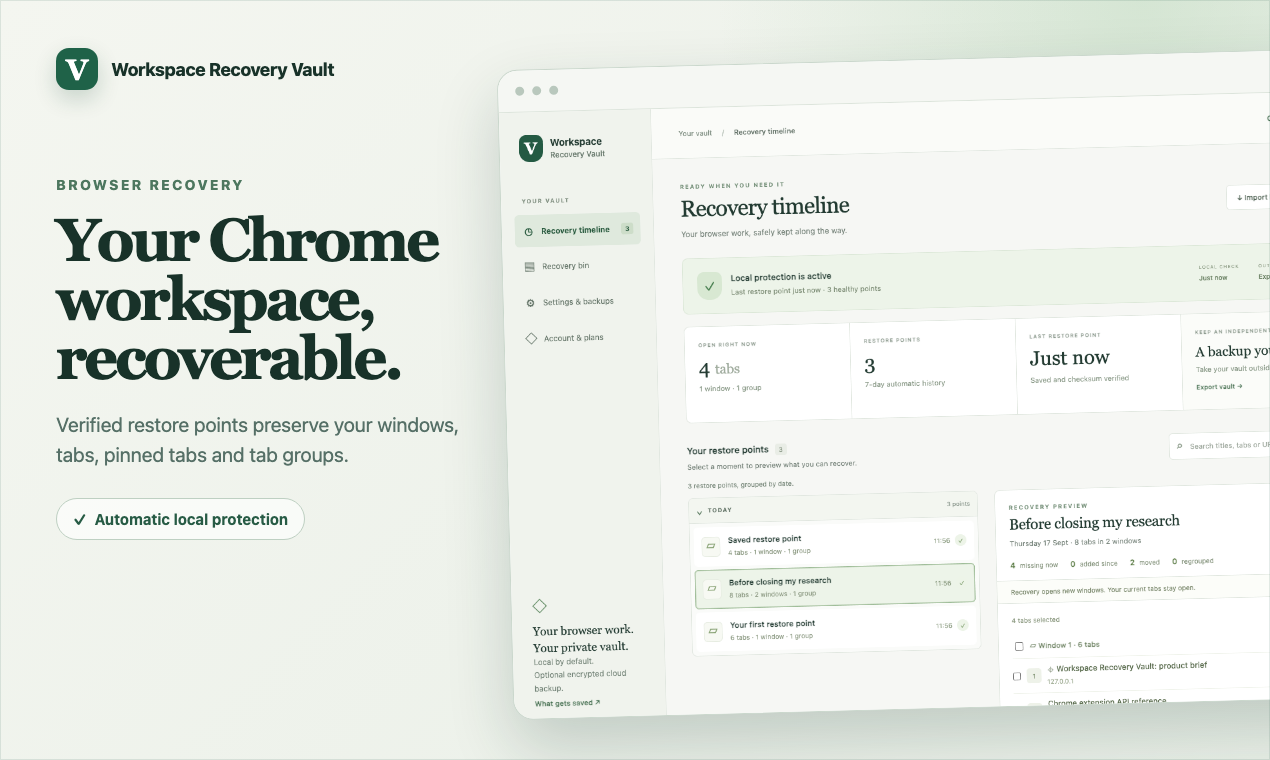
What it does
Automatic restore points
Windows, tabs, pinned tabs and tab groups are saved every 5 minutes and after changes while Chrome runs. No need to remember to save a session.
Recovery timeline
Restore points are grouped by date and searchable by title or address, so you can find the moment before things went wrong.
Preview before you restore
See which tabs are missing, added or moved compared with your current workspace, then tick only the ones you want back.
Safe recovery
Recovered tabs open in new windows with their groups and pins. Your current tabs stay open and untouched.
Verified integrity
Every restore point carries a checksum, so a damaged save is flagged instead of silently restoring the wrong thing.
Backups you own
Export readable JSON or passphrase-encrypted archives and import them on another computer or profile.
Why not just use Chrome's "Restore tabs"?
Chrome's built-in recovery offers your last session and a short "Recently closed" list. If Chrome restarts again before you restore, or you close the wrong window, that can be gone. The Vault keeps its own dated history inside your profile and lets you save it elsewhere.
| Chrome built-in | Workspace Recovery Vault | |
|---|---|---|
| Reopen the last session after a crash | Usually | Yes |
| Go back to a session from days ago | No | Yes, 7 days free, up to 1 year with Pro |
| See what's missing before restoring | No | Yes |
| Restore only selected tabs or groups | No | Yes |
| Encrypted backup file you can move | No | Yes |
Switching from OneTab or Session Buddy?
Bring your saved tabs with you. Click Import backup in the Vault and choose a OneTab text export or a Session Buddy JSON export. Each group, session or collection becomes a restore point you can preview and recover, and imported sessions are kept until you delete them. Your original data is only read, never changed. See the step-by-step guides for OneTab and Session Buddy.
Private by design
Restore points stay in your Chrome profile. The Vault records tab addresses, titles and how your windows are organised. It never captures page contents, form drafts, cookies, passwords or Incognito tabs, and it doesn't inject anything into websites. There are no ads, no analytics and no remotely loaded code. Optional Pro cloud copies are encrypted with AES-256-GCM on your device before upload, and your passphrase is never sent. Read the privacy policy.
Plans
Free: automatic local restore points, 7-day history, integrity checks, recovery previews, basic search and manual export and import. No time limit.
Pro (£2.99 per month or £24 per year): up to 1 year of history, date, domain and device filters, scheduled encrypted downloads and optional encrypted cloud recovery on up to 5 devices (250 MB per account, 10 MB per copy).
Local Lifetime (£49 once): the local premium features permanently, without hosted cloud backup.
Every payment has a 14-day refund window. See the plan terms and refund policy.
Questions
Can I restore Chrome tabs after a crash?
Yes. Open the Vault from the toolbar, choose a restore point from before the crash, check the preview and recover the tabs you want. They open in new windows. If you hadn't installed the Vault yet, follow our step-by-step guide to Chrome's own recovery options.
How is this different from Chrome History?
History lists pages one by one. It doesn't remember which window or tab group a page was in, and it can't reopen a whole workspace. The Vault restores the structure too.
Does it restore tab groups and pinned tabs?
Yes. Tab groups keep their names and colours, and pinned tabs stay pinned.
Can I move my tabs to another computer?
Export an encrypted archive and import it on the other computer, or use Pro cloud recovery across up to 5 devices. See how to back up Chrome tabs and tab groups.
Can I import tabs from OneTab or Session Buddy?
Yes. Use Import backup with a OneTab text export or a Session Buddy JSON export. See the OneTab and Session Buddy guides.
Will it slow Chrome down?
Nothing is injected into the websites you visit. Restore points are small records of addresses and titles saved in the background.
How many tabs can it recover?
Up to 500 tabs per recovery. For bigger workspaces, recover one window or group at a time.
Add Workspace Recovery Vault to Chrome
Support
Email sagepennystudio@gmail.com with your Chrome version and a description of the issue. Please don't send readable archives, recovery codes, passphrases or sensitive tab addresses. Encrypted-export and cloud passphrases cannot be recovered, so keep them safe.